How to Turn a Lecture Recorded on Your Phone Into Revision Notes in 2026
By leveraging inkkd note-taking ai, you can quickly generate a transcript that makes your content fully searchable. This process helps you move from a simple recording to structured ai-generated study notes in just a few clicks.
How to Turn a Lecture Recorded on Your Phone Into Revision Notes in 2026
Struggling to keep up with fast-paced university classes? Many students find that replaying hours of audio feels like a massive waste of time. You can now transform your recorded lecture notes into organized summaries without the stress. Explore INKKD Features.
Import the Lecture Audio or Recording into Inkkd
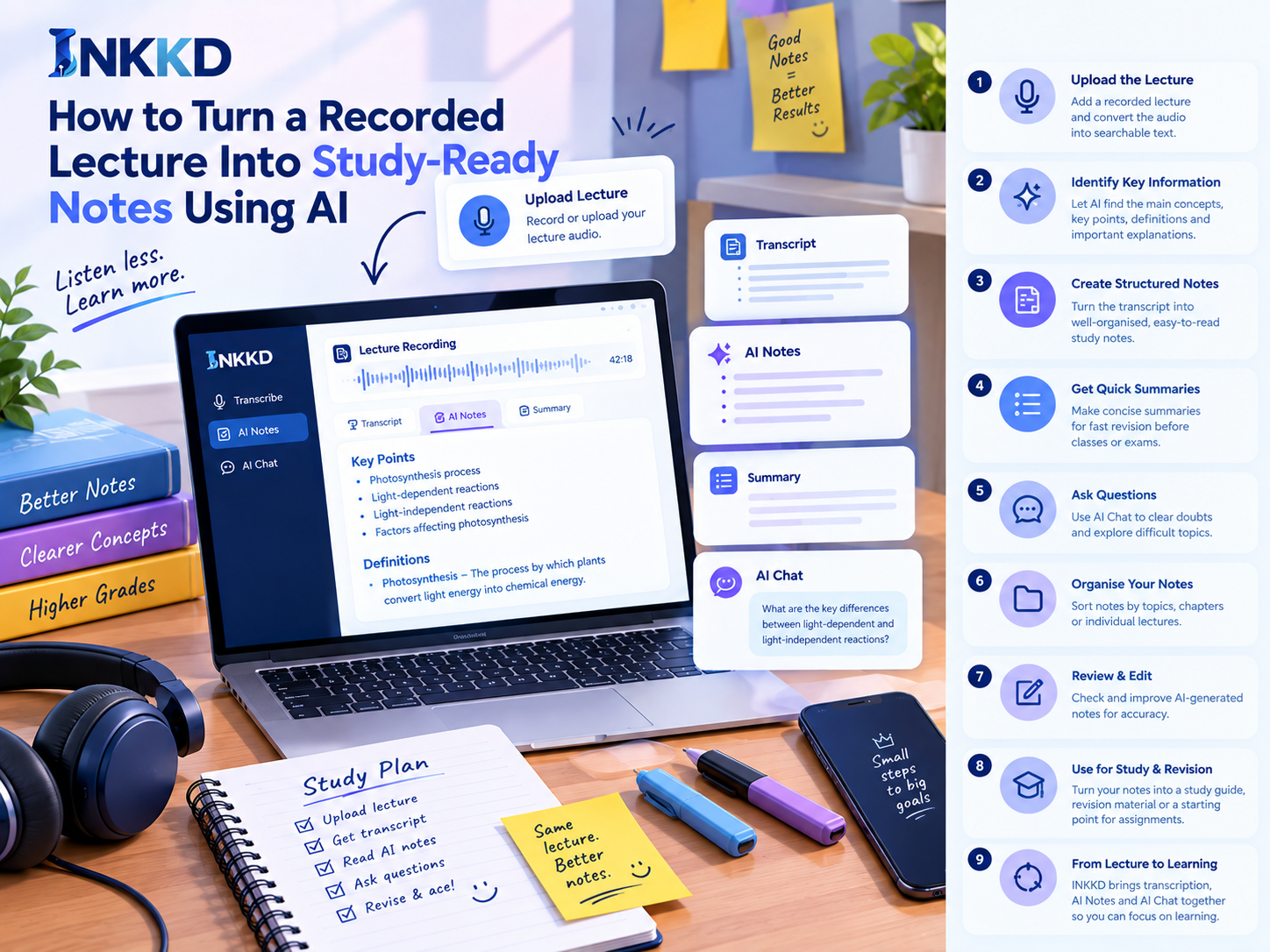
Inkkd simplifies the process of turning complex lecture audio into clear, searchable study notes. To begin, simply upload your recorded lecture file directly into the platform. This AI note-taking tool handles various audio formats, ensuring your files are ready for processing in seconds.
| Feature | Manual Note-Taking | AI-Generated Notes |
|---|---|---|
| Speed | Slow and tiring | Instant and efficient |
| Accuracy | Prone to human error | High with verification |
| Organization | Requires manual effort | Automatic structure |
| Revision | Hard to scan | Easy to review |
Use Lecture Transcription to Find Important Moments Quickly
Once your file is uploaded, the system automatically converts the audio into text. This transcription to study notes process allows you to navigate your lectures without listening to every minute again. You can jump straight to the most relevant parts of the discussion, saving you valuable time during your revision sessions.
Check the Transcript for Clear Sections and Speaker Context
Before you finalize your automated study notes, it is vital to review the generated text for clarity. Ensure that the speaker context is accurate and that the AI has correctly identified different sections of the lecture. Taking a moment to verify these details ensures that your study notes AI tool provides the most reliable source material for your exams.
Use Searchable Text to Locate Terms, Examples, and Explanations
The true power of this system lies in its search functionality. You can instantly find specific terms, complex examples, or detailed explanations by typing keywords into the search bar. Using these study aids AI features makes the entire lecture-to-notes conversion process much more efficient. You no longer need to scrub through hours of audio to find that one specific definition you missed in class.
Turn the Transcript Into Structured AI-Generated Study Notes
Stop wasting hours re-listening to recordings and start using AI to structure your learning. An AI study notes generator helps you convert raw audio into a clean, readable format. This process saves time and ensures you capture every vital detail from your lectures.
Extract Main Concepts, Key Points, and Important Explanations
The first step in study notes automation is identifying the core themes. AI tools scan your transcript to pull out the most relevant arguments and theories. This allows you to focus on understanding the material rather than transcribing it manually.
Highlight Definitions, Processes, Examples, and Supporting Details
You can easily transform lecture content into notes that categorize complex information. By highlighting specific definitions and step-by-step processes, you create a reliable reference guide. These AI-powered lecture notes ensure that examples and supporting details are always easy to find.
Arrange Notes by Topics, Chapters, or Individual Lectures
Organization is key to effective revision. You should arrange your notes by specific chapters or lecture dates to keep your digital binder tidy. This structured approach makes it much simpler to locate information when you are preparing for a specific exam.
Use Headings, Bullet Points, and Logical Sections for Clarity
Using clear formatting is essential for readability. You should use headings and bullet points to break up dense text into manageable chunks. This visual hierarchy helps your brain process information faster during late-night study sessions.
Condense Long Explanations into Quick-Revision Study Notes
Long-winded explanations often hide the most important facts. An AI study notes generator can summarize these sections into concise bullet points. This method is perfect for quick revision when you are short on time.
Prepare a Short Summary to Review Before Class or an Exam
A brief summary acts as a perfect refresher before you enter the classroom. By condensing your automated lecture notes into a high-level overview, you keep the main concepts fresh in your mind. This strategy builds confidence and improves your overall retention.