What Should a Company Include in Its Policy on AI Tools in Meetings?
Establishing clear standards for automated transcription and meeting assistants allows businesses to benefit from improved documentation without compromising corporate security.
What Should a Company Include in Its Policy on AI Tools in Meetings?
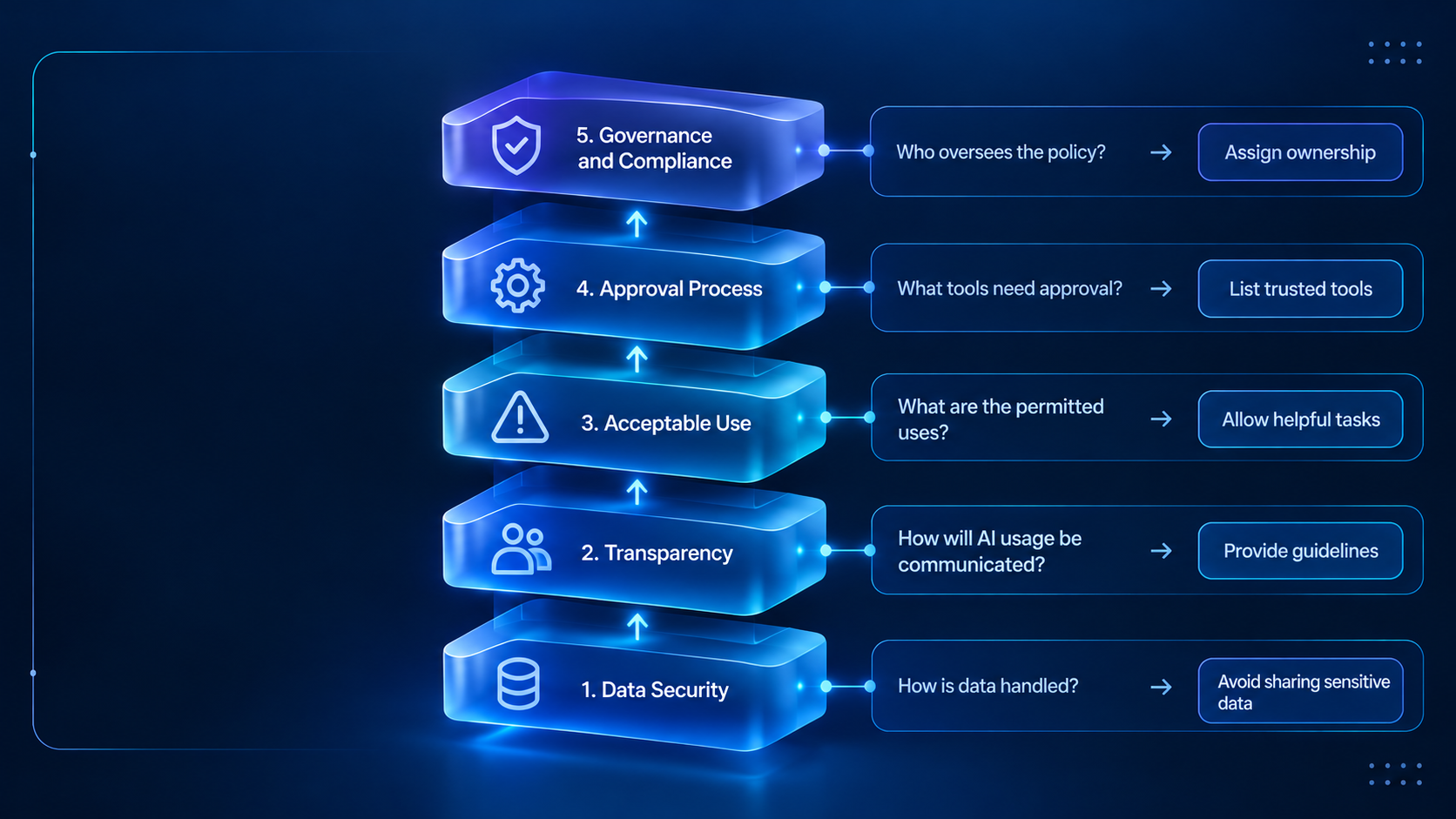
Deploying AI tools in meetings helps teams capture notes, track action items, and automate transcription, but unmanaged use introduces severe privacy, confidentiality, and compliance risks. A formal workplace policy establishes clear parameters for which software is permitted, how participant consent is obtained, and who remains accountable for the accuracy of meeting records.
“Prohibit AI transcription and audio capture during sensitive internal proceedings, including disciplinary hearings, restructuring negotiations, merger reviews, and discussions protected by legal professional privilege.“
Balancing team productivity with corporate governance requires setting distinct boundaries for enterprise tools versus personal software activated by individual attendees. Clear standards protect proprietary conversations, client data, and legally privileged exchanges while supporting accessible, efficient collaboration across hybrid environments.
Defining Policy Scope and Tool Classification
Organizations maintain control by cataloging software into three defined tiers of operational clearance. Centralized IT management verifies security configurations, data encryption, and vendor model training settings before any tool enters everyday business workflows.
Enterprise — Approved
Company-managed meeting software with verified data processing protections and administrative access oversight.
Personal — Restricted
Individual browser plugins or consumer bots requiring written security approval before connecting to work calls.
Unvetted — Prohibited
Autonomous third-party transcription software lacking institutional contracts or strict data isolation agreements.
Human Oversight, Accuracy, and Workflow Verification
Natural language systems frequently produce incomplete summaries, fabricate nonexistent action items, or misattribute statements to the wrong speaker. Employees must treat automated outputs as draft notes rather than definitive corporate records.
- Compare every summarized action item against actual discussion points before assigning departmental responsibility.
- Check speaker attributions to verify that agreements or decisions are not assigned to the wrong attendees.
- Review generated text for subtle algorithmic bias or hallucinated facts prior to formal distribution.
- Flag and document material inaccuracies in meeting logs to support ongoing software calibration.
Governance, Accessibility, and Legal Compliance
A comprehensive workplace policy integrates accessibility principles alongside risk management. Real-time transcription provides crucial accommodation for individuals with hearing impairments or multilingual teams, supporting broader workplace inclusion when implemented under clear security guardrails.
Governance and Training
Assign designated system owners within IT or compliance to conduct periodic software audits and facilitate regular training for all staff.
Incident Reporting
Establish a rapid reporting procedure for unauthorized bot entries, improper recordings, or unintended disclosures of confidential material.
Sample Policy Framework for Organizational Use
Organizations can adapt the following structural clauses to assemble a tailored operational standard. Adjust the precise terminology to align with internal technical infrastructure and regional regulatory obligations.
- Scope: This policy governs all automated recording, transcription, and summarization technology deployed across company meetings, virtual calls, and physical conference rooms.
- Permitted Systems: Staff may only use company-provisioned software accounts; third-party attendee bots lacking IT authorization remain strictly banned.
- Consent Requirement: Meeting organizers must announce the presence of recording tools prior to substantive discussion and immediately deactivate them upon participant objection.
- Restricted Subjects: Automated capture is prohibited during disciplinary proceedings, sensitive personnel evaluations, legal consultations, and strategic acquisition negotiations.
- Review Accountability: Generated summaries and tasks require human verification before being stored as binding corporate decisions or shared with external stakeholders.
Frequently Asked Questions
Can employees invite their own AI assistants to company meetings?
Organizations should prohibit unauthorized personal assistants because unvetted tools may store conversational data on non-secure servers or use proprietary discussions to train external models. Only software reviewed and provisioned by IT should access workplace conversations.
How should meeting hosts handle an external client who declines recording?
Meeting hosts must immediately disconnect the automated assistant or disable recording functionality when a participant objects. The host should proceed with standard manual note-taking to respect client privacy preferences.